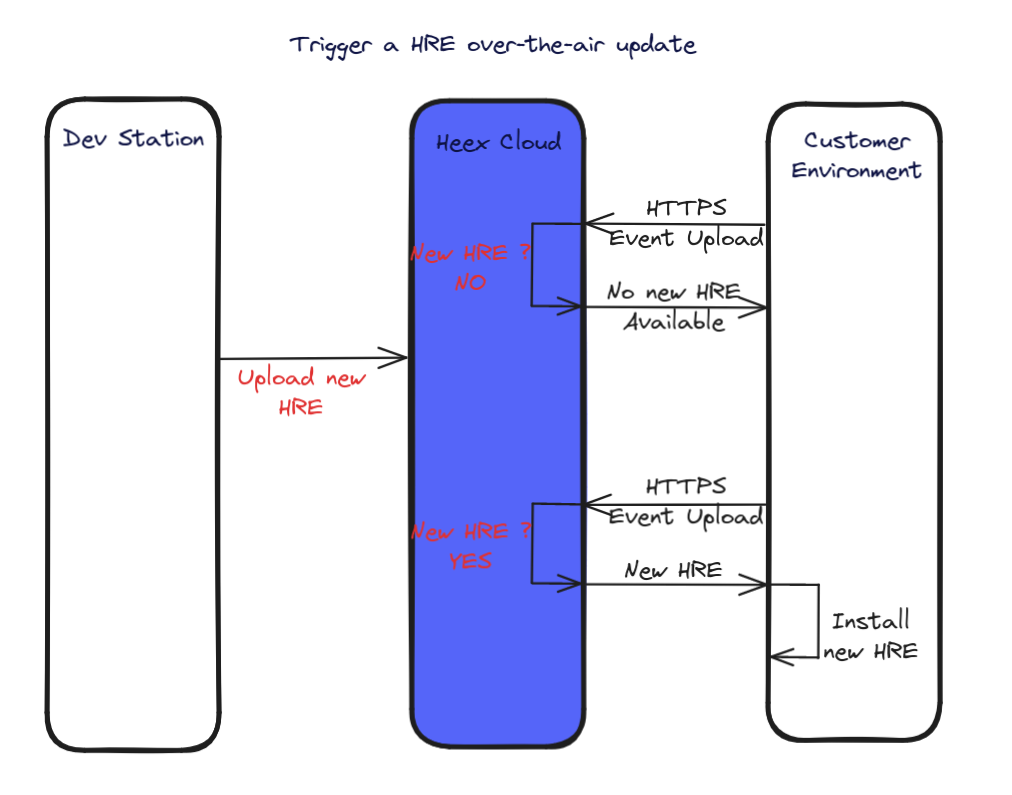
To facilitate the deployment onto your production systems, we have set up the possibility to automatically update the Agent of your systems by uploading new installers from any Dev Station. This option is by default enabled, and if you wish to disable this functionnality, you can easily do so, seeDocumentation Index
Fetch the complete documentation index at: https://doc.heex.io/llms.txt
Use this file to discover all available pages before exploring further.
Configuration below.
Requirements
- Any system you wish to OTA update needs to have the functionnality enabled (see
Configurationbelow). - The installer that you upload needs to be built from the same operating system and architecture as the one you aim to update.
Configuration
The configuration of the OTA needs to be done before packaging your installer and installation onto the system. This means that once you have set your configuration and deployed the installer onto your system, you will not be able to modify it unless you re-install a new Agent. The settings can be found in the Core configuration file:Open
~/Heex_SDK_<version>/kernel/Core.conf and look for the enableAgentOtaUpdate setting: this is the switch to enable / disable to OTA feature. Setting it to 0 will disable it, by default it is set to 1.
Updating your system over the air
Once you have a Agent running on your system that allows OTA updates, you will be able to upload new installers from anywhere, and they will automatically be downloaded and installed onto the systems. To do so, simply add your new implementations in theimplementations folder as described in the installer page, and from inside the Heex_SDK_<version> folder, upload the installer using following command:
How it works ?
After you save configuration changes in the UI, they’ll be sent to the connected devices (implementations) during the next data upload. After you upload the new installer from your dev station, it’ll be sent and installed to the connected devices (implementations) during the next data upload.📝 Note: In the image below HRE stands for Agent. This will be updated soon!