Documentation Index
Fetch the complete documentation index at: https://doc.heex.io/llms.txt
Use this file to discover all available pages before exploring further.
Heex follows a Smart-Data philosophy: instead of recording everything and filtering later, we filter intelligently and capture only relevant data. This reduces storage by 70-90% while ensuring every captured event is meaningful.
Start risk-free: Deploy Heex on a server to analyze your existing ROS bags and historical data—no changes to your robots, no risk of missing critical information. Once your triggers are refined and validated, deploy the same configuration to production robots for real-time capture.
High-Level Flow
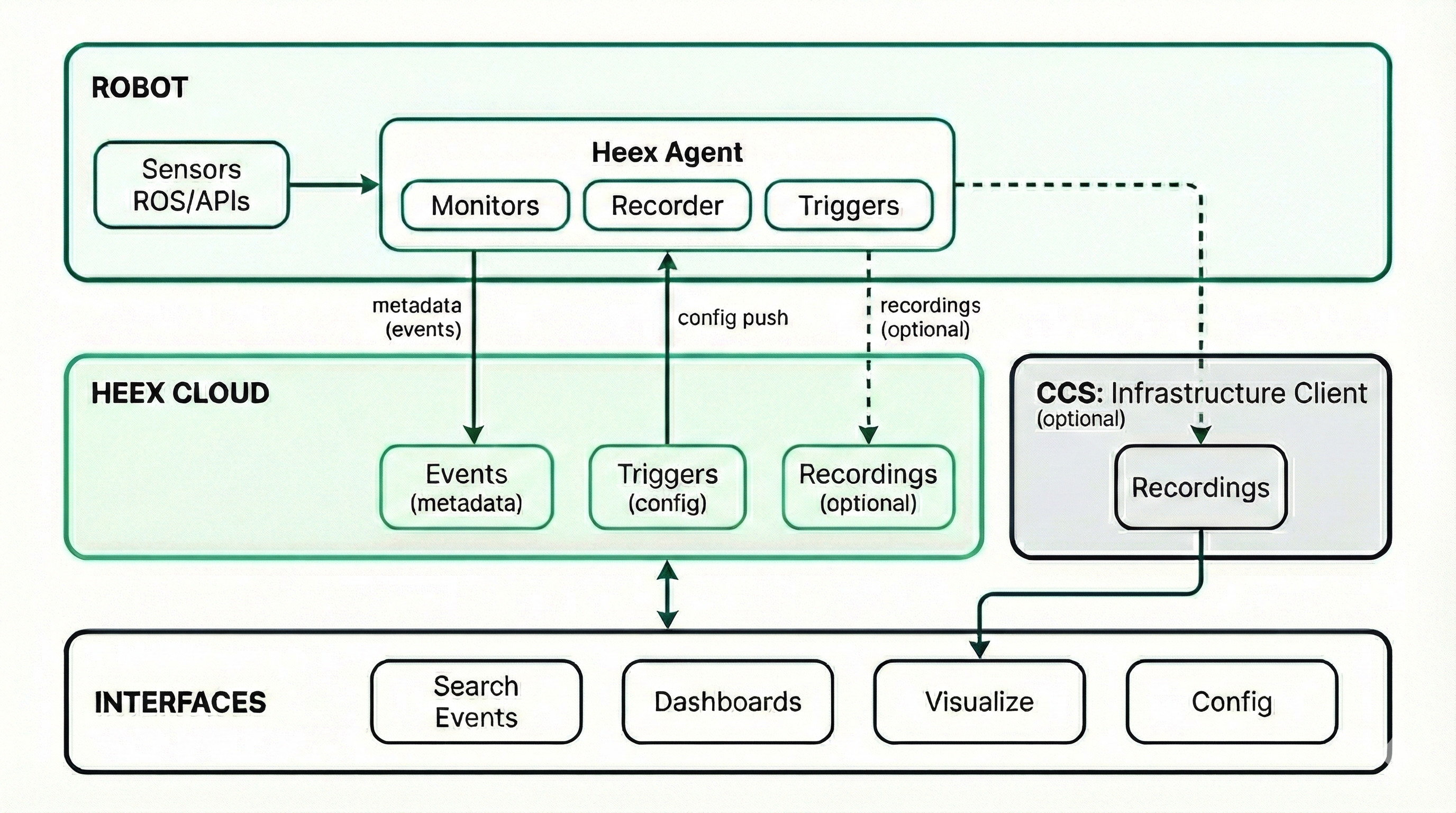
The Smart-Data Approach
Think of Heex like a smart security camera for robots:
| Traditional Approach | Heex Smart-Data |
|---|
| Record 24/7 continuously | Record only when conditions are met |
| 100GB+ per day per robot | 500MB-2GB per day per robot |
| Hard to find relevant moments | Every recording is a tagged, searchable event |
| Review hours of footage | Jump directly to the incident |
Three-Layer Architecture
1. Edge Layer (Agent Deployment)
The Heex Agent can be deployed in two environments with the same workflow:
| Deployment | Use Case | Data Source |
|---|
| Edge (Robot) | Real-time monitoring on physical systems | Live sensor data, ROS topics |
| Server | Historical data analysis and replay | ROS bags, recorded datasets |
- Start on a server — Analyze your existing ROS bags and historical datasets with zero impact on operations
- Refine your triggers — Iterate until you’re confident you’re capturing the right events
- Deploy to production — Push the same validated configuration to your robots via OTA
No workflow changes required until you’re ready. No fear of being blind to critical data.
The agent runs with minimal footprint:
- < 6% CPU usage on Jetson Orin NX
- < 1% RAM overhead
| Component | Role |
|---|
| DataSource | Connection to data streams (ROS topics, sensors, APIs, or ROS bags) |
| Signal | Individual data point from a DataSource (speed, temperature, GPS) |
| Agent | Orchestrates monitoring and recording |
| Monitor | Watches signals for trigger conditions |
| Recorder | Captures data when events occur |
| Component | Role |
|---|
| Workspace | Isolated environment for your team/project |
| System | Represents a physical robot in the platform |
| Trigger | Defines conditions and recording rules |
| Event | Generated when trigger conditions are met |
Privacy by Design
Heex separates metadata from raw data to protect your operational information:
| Data Type | Storage Location | Content |
|---|
| Metadata | Heex Cloud | Event timestamps, trigger info, system status, labels |
| Recordings | Your Cloud Storage | Raw sensor data, ROS bags, video files |
- Your sensitive operational data never leaves your infrastructure
- Only lightweight metadata is transmitted to Heex for indexing and search
- You maintain full control over your recordings storage and retention policies
Over-the-Air (OTA) Updates
Deploy configuration changes across your entire fleet in minutes:
- Push new triggers, monitors, and recording rules remotely
- Update all systems simultaneously or target specific groups
- No physical access required—manage robots worldwide from a single dashboard
- Changes propagate automatically when systems connect
3. Analysis Layer (Insights)
Access and analyze your Smart-Data:
| Component | Role |
|---|
| Event Search | Filter events by system, trigger, time, labels |
| Recordings | Download or stream captured data |
| Dashboards | Visualize trends and analytics |
| Studio | Replay and analyze recordings |
How It Works: A Practical Example
Imagine monitoring a warehouse robot for near-collision events:
T+0s    Robot operating normally, speed = 5 km/h
T+10s   Robot accelerates, speed = 22 km/h
T+10s   Agent monitor detects: speed > 20 km/h ✓
T+10s   Agent monitor detects: obstacle_distance < 1m ✓
T+10.1s Both conditions met → Trigger fires
T+10.1s Event created with metadata (system, location, values)
T+10.2s Recorder captures: 5 seconds before + 10 seconds after
T+11s   Recording uploaded to cloud with event tags
T+12s   Notification sent to operations team
Ways to Interact with Heex
Heex provides multiple entry points to fit your workflow:
| Interface | Best For | Description |
|---|
| Web UI | Visual management | Full-featured dashboard for configuration, monitoring, and analysis |
| CLI | Automation & scripting | Command-line tool for CI/CD pipelines and programmatic access |
| Copilot (beta) | Natural language | AI assistant to query events and configure triggers conversationally |
Key Benefits
| Benefit | How Heex Delivers |
|---|
| Risk-free adoption | Start on historical data, deploy to production when ready |
| Reduced storage costs | 70-90% less data through intelligent filtering |
| Faster incident response | Events are tagged and searchable instantly |
| Remote fleet management | OTA updates across your entire fleet in minutes |
| Privacy by Design | Metadata on Heex, recordings stay on your infrastructure |
| Minimal edge impact | Less than 6% CPU, less than 1% RAM on edge devices |
| Scalable deployment | Same triggers work across 1 or 1000 robots |
| Flexible access | Web UI, CLI, or Copilot—work the way you prefer |
Next Steps

